The team is now working on the WordPress Interactivity API. This unblocks the same UX Frontity framework enabled but directly in WordPress Core, fully compatible with the new Site Editor.
I’m sorry for bombarding with help requests but I am stuck with another issue.
I am using gsap ScrollTrigger in one of the components. The ScrollTrigger simply pins an element at the top.
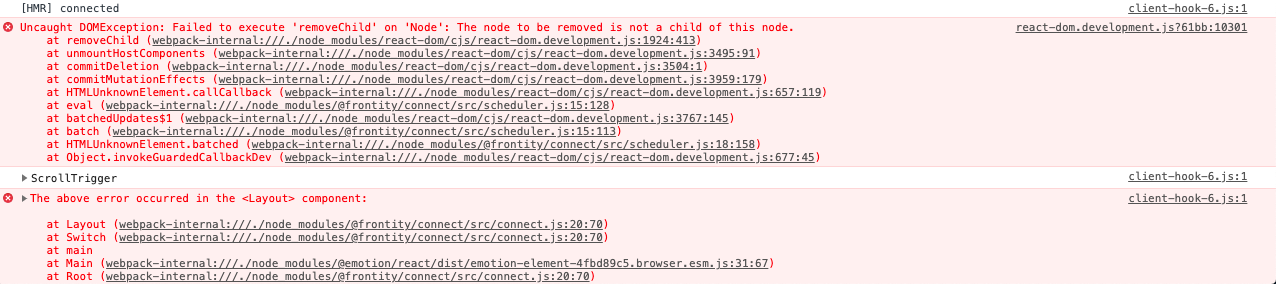
That works fine until I navigate to another page, where I get this error
Uncaught DOMException: Failed to execute 'removeChild' on 'Node': The node to be removed is not a child of this node.
Are you by any chance familiar with this error?
I am killing the gsap animation when the component unmounts and that seems to be working fine. The issue comes only if I pin the element, not happening with any other gsap animation.
I have asked on the gsap forum about this and they have no idea why I am getting this error. They think it could be a conflict with the styled components or with a package in the application.
I have tried with removing the styled components and used inline styling but that didn’t solve the problem.
Do you have an idea as of why I could be getting that error? Could there be a package that you think could go in conflict with gsap?
Someone else was having the same issue with an app in Gatsby and they have figured out that it was indeed a package, this is what they said
it ended up being due to a package that was being used on the component for unique ids that seemed to be mixing up the node references. This had been previously been used as the ‘key’ prop on the node list.
Here is a codesandbox that shows the issue
Thank you so much.
mburridge2
Hi @jeffceriello
Have you changed something in your codesandbox project? I’m not seeing that error.
jeffceriello3
Hi @mburridge
I’ve not made any change, the error is still showing for me. If you inspect the codesandbox iframe with the Chrome inspector and click on the “About” link at the top of the page you should see this error
If I comment out line 24 (pin: true,) in the file /packages/mars-theme/src/components/verticalSlider.js there are no errors.
I can go live with the codesandbox in case you would like to edit it?
Many thanks
mburridge4
Hi @jeffceriello
No, I’m not seeing that and the codesandbox seems to be working for me - though I’m not sure exactly what behaviour to expect. What do you mean by “inspect the codesandbox iframe”? I had the Chrome devtools console open when I tried it.
jeffceriello5
Hi @mburridge
I meant to right click in the codesandbox browser panel and inspect that. I’m sorry, english is not my mother tongue…
I’ve made a video that illustrates the error and also shows that there are no errors if I comment out line 24. Here is a link
Thank you
jeffceriello6
Hi @mburridge
Just to follow up on this issue, did you by any chance manage to take a look at it and have any idea on what is causing the errors?