The team is now working on the WordPress Interactivity API. This unblocks the same UX Frontity framework enabled but directly in WordPress Core, fully compatible with the new Site Editor.
Hey,
how is it possible to use additional fields from WP API? For now, it seems that it’s filtered and I have to adapt wp-source to set additional fields in the models, is that correct or is there an easier option, maybe with adapting a configuration?
Thank you!
luisherranz3
You just need to expose the custom fields in the REST API.
One they are in the REST API response, you’ll be able to access them in Frontity, just like you access the title or content .
2 Likes
jwd.05.mail6
ok, that`s cool, but how ca i get the custom fields if it is custom fields in Theme options ?
i created it by these funcs. in functions.php
use Carbon_Fields\Container;

use Carbon_Fields\Field;

add_action( 'carbon_fields_register_fields', 'crb_attach_theme_options' );

function crb_attach_theme_options() {

    Container::make( 'theme_options', __( 'Theme Options', 'crb' ) )

        ->add_fields( array(

            Field::make( 'text', 'crb_text', 'Text Field' ),

        ) );

}
how can i get the fields ?
mburridge7
Hi @jwd.05.mail
The documentation for Carbon Fields says the following about adding fields to the WP REST API:
Fields can be exposed in WordPress’ REST API by using their set_visible_in_rest_api() method: Field::make(...)->set_visible_in_rest_api( $visible = true )
Hope this helps.
mh1238
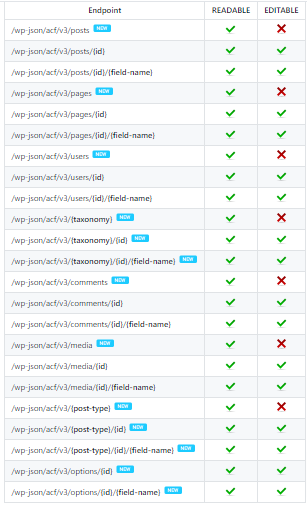
I added the ACF and ACF TO REST API plugin to my WP, however I see the empty array of acf in the wp-json. Any suggestion?
luisherranz9
If the problem is in the REST API output maybe you are going to have more luck if you ask about it to the owner/maintainers of the ACF TO REST API plugin. I’m sure they’ll know more about the issue